Costs
How much does it cost to make an app in the UK?
How much does it cost to make an app in the UK? It depends mostly on how many features you build. At Ingenious App Studios, a small first version starts from about £5,000 and around £10,000 is typical. Apps with lots of features, several types of user and an admin system cost much more.
This guide shows where that money goes. It uses real UK day rates, lists the running costs most quotes leave out, and shows good and bad examples of app briefs and quotes. It's written for founders planning a first app, so it focuses on spending as little as possible before you know people want what you're building.
What you're paying for when you build an app
Most of an app's price is people's time. A developer or agency estimates how many days each feature will take, adds design, testing and project management, then multiplies the total by a day rate. That's why the same idea can get very different quotes: the estimate, the rate, or both are different. So the honest answer to how much does it cost to develop an app is the same every time: how many days, at what rate.
A typical build has five parts:
- Discovery: agreeing who the app is for and what the first version must do.
- Design: the screens, and how people move between them.
- Development: the app itself, plus the backend (the server, database and admin tools behind it).
- Testing: on real iPhones and Android phones.
- Launch: store listings, and getting through Apple's and Google's review.
If a quote doesn't show time against each part, ask for it. It's the only fair way to compare two quotes.
What do UK app developers charge?
UK contract app developers typically charge around £400 to £470 a day. In UK contract job adverts over the six months to 14 September 2026, the median day rate was £470 for Flutter, £450 for Android developers and £401 for iOS developers, according to IT Jobs Watch.

Day rates are the biggest single input into the cost to build an app, but those figures are for one contractor. An agency's price also covers design, project management, testing and support. So compare it with the whole team you'd otherwise hire, not with one developer's day rate.
Freelancer, agency, offshore team or do it yourself?
| Option | What you get | Watch out for |
|---|---|---|
| UK freelancer | One developer, usually the lowest UK price per day | You manage design, testing and the project yourself, and one person can get ill or busy |
| UK agency | A team covering design, development, testing and project management | A higher price per day; check who actually does the work |
| Offshore team | Lower day rates in many countries | Time zones, communication, and making sure you own the code |
| No-code or AI app builder | The lowest cash cost | Your own time, platform limits, and moving off the platform later |
Whoever you choose, there are other ways to cut software development costs and time that work with any team.
What makes an app cost more to build?
The number and difficulty of features is the biggest driver of what it costs to build an app. Every extra type of user, integration or real-time feature adds design, development and testing time. It also adds work every time the app is updated, so complexity keeps costing after launch.
These are the features that push a quote up most often:
- More than one type of user. A dog walking app needs an owner app, a walker app and usually an admin panel for you.
- Payments and subscriptions, including refunds, receipts and failed payments.
- Real-time features such as live location, chat and instant notifications.
- Connecting to other systems, like a booking tool, accounting software or health data.
- Custom animation and highly branded design instead of standard iPhone and Android patterns.
- Sensitive personal data. Health or financial data means more security work and more care with UK GDPR.
- Two separate native apps for iPhone and Android, which is the next section.
Does Flutter make an app cheaper?
Flutter usually makes an app cheaper to build and maintain, because one codebase runs on both iPhone and Android. You design, build and test each feature once instead of twice. It doesn't halve the price, though: design, the backend and store releases cost the same whichever way you build.

Flutter is an open-source framework for building apps for several platforms from a single codebase, and it's what we mainly build with. It isn't always the right choice. Apps built around heavy 3D or augmented reality, or that depend on unusual hardware features, can be better as native apps. We cover the trade-offs in is Flutter good for app development, and how we work in Flutter app development for founders.
How much does it cost to run an app?
Running a small app can cost very little at first. Apple charges 99 US dollars a year to publish on the App Store and Google charges a one-off US$25, while hosting and analytics often start on free plans. The bigger ongoing cost is maintenance: keeping the app working as Apple, Google and phones change.
| Cost | What it's for | Amount |
|---|---|---|
| Apple Developer Program | Publishing on the App Store | 99 USD a year, shown in pounds when you enrol |
| Google Play Console | Publishing on Google Play | US$25, one-off |
| App Store commission | Paid apps and in-app purchases of digital content | 15% if you earn up to US$1 million a year, otherwise 30% |
| Google Play service fee | Digital sales through Google Play billing | For UK users installing from 30 June 2026, 10% plus a 5% billing fee on your first US$1 million a year |
| Card payments for real-world services | Taking payment for something like a dog walk | With Stripe, 1.5% + 20p per standard UK card payment |
| Hosting and database | Storing users' data, for example on Firebase | Free plan up to 50,000 database reads a day, then pay as you go |
| Analytics | Seeing what people do in your app, for example with Mixpanel | Free up to 1 million events a month |
| Maintenance | OS updates, fixes, store requirement changes | Depends on the app; ask for a monthly figure before you start |
| VAT | Added to invoices from VAT-registered UK suppliers | 20% standard rate |
Do Apple and Google take a cut of your sales?
Apple and Google only take a cut when you sell digital content or features inside the app. But most founders' apps sell something in the real world, like a walk, a class or a delivery. Apple's App Review Guidelines say payments for goods and services used outside the app must not go through in-app purchase. So those payments go through a card provider such as Stripe, and Apple's commission doesn't apply to them.
How much does it cost to maintain an app?
How much it costs to maintain an app depends on how often you change it. But some maintenance is needed every year whatever you do, because Apple and Google keep raising the requirements an app must meet to stay in their stores and receive updates.
For example, since 28 April 2026, Apple only accepts apps built with Xcode 26 and the iOS 26 tools. From 31 August 2026, new Android apps and updates must target Android 16, and apps that fall too far behind stop being available to people on newer Android phones. An app nobody updates slowly disappears. So ask for a monthly maintenance figure before the build starts, and put it in your budget from day one. Our app maintenance service explains what that work involves.
If your app stores personal data, also check whether you need to pay the ICO's data protection fee.
How do you get an accurate app development quote?
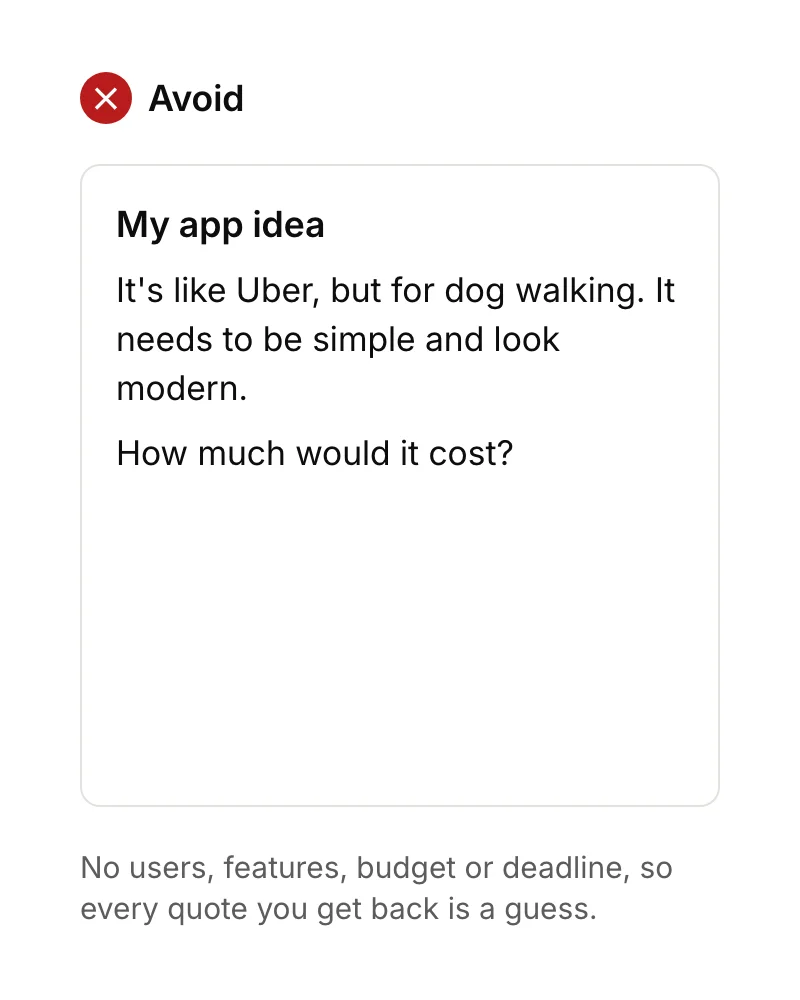
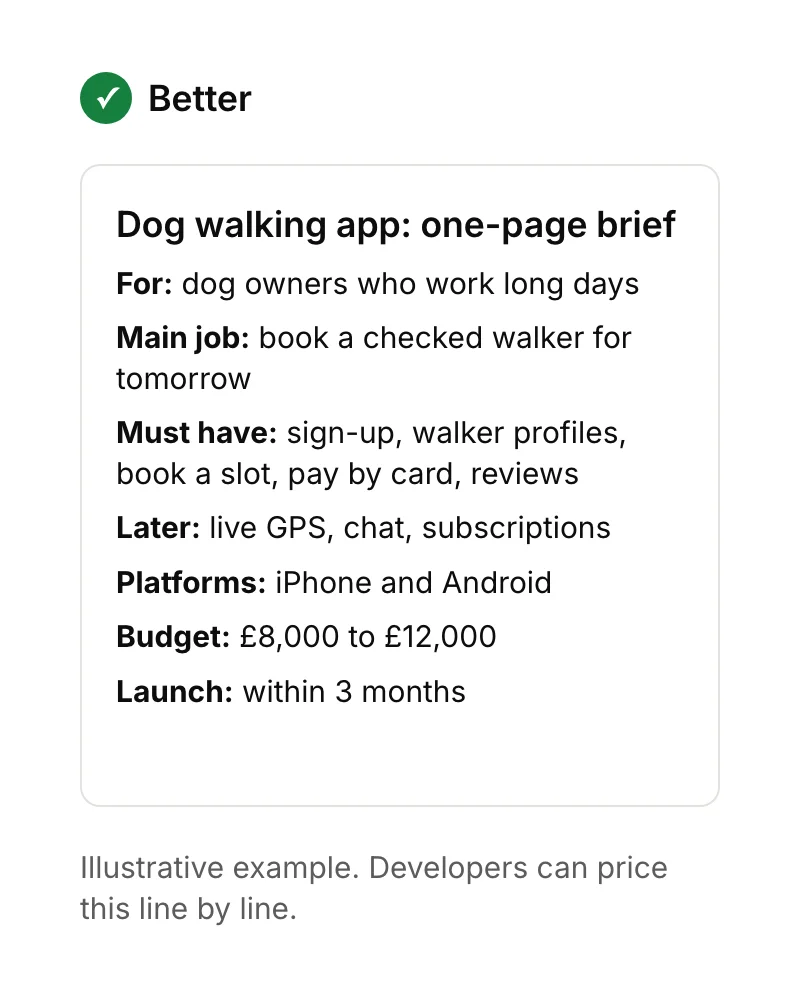
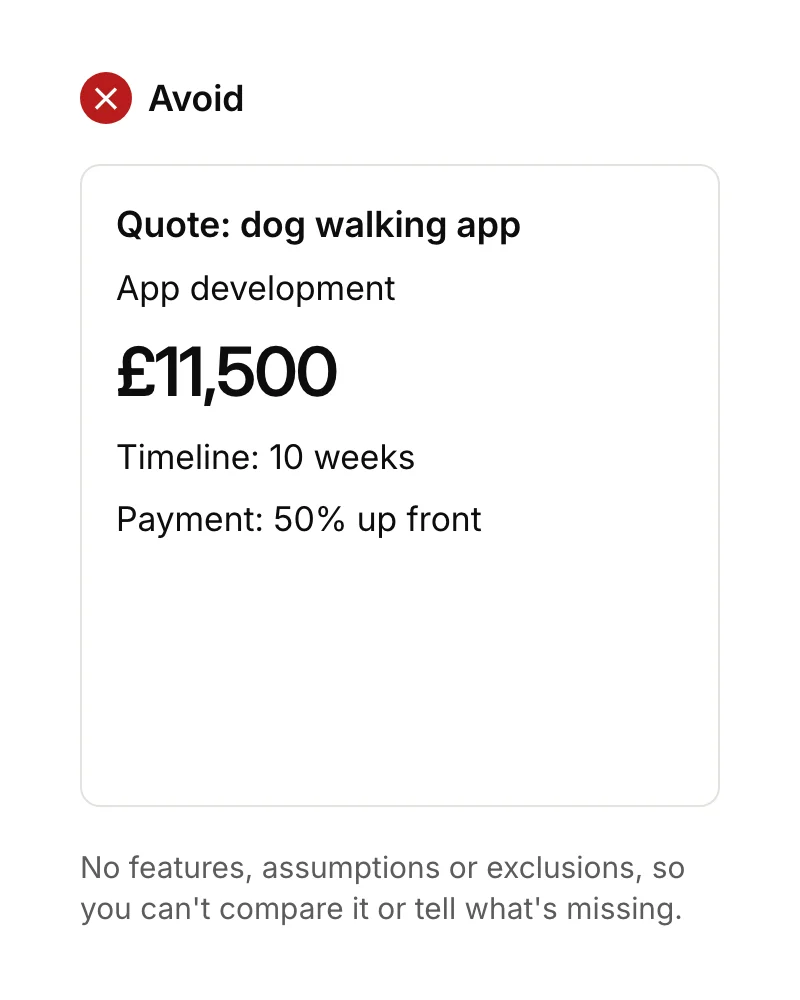
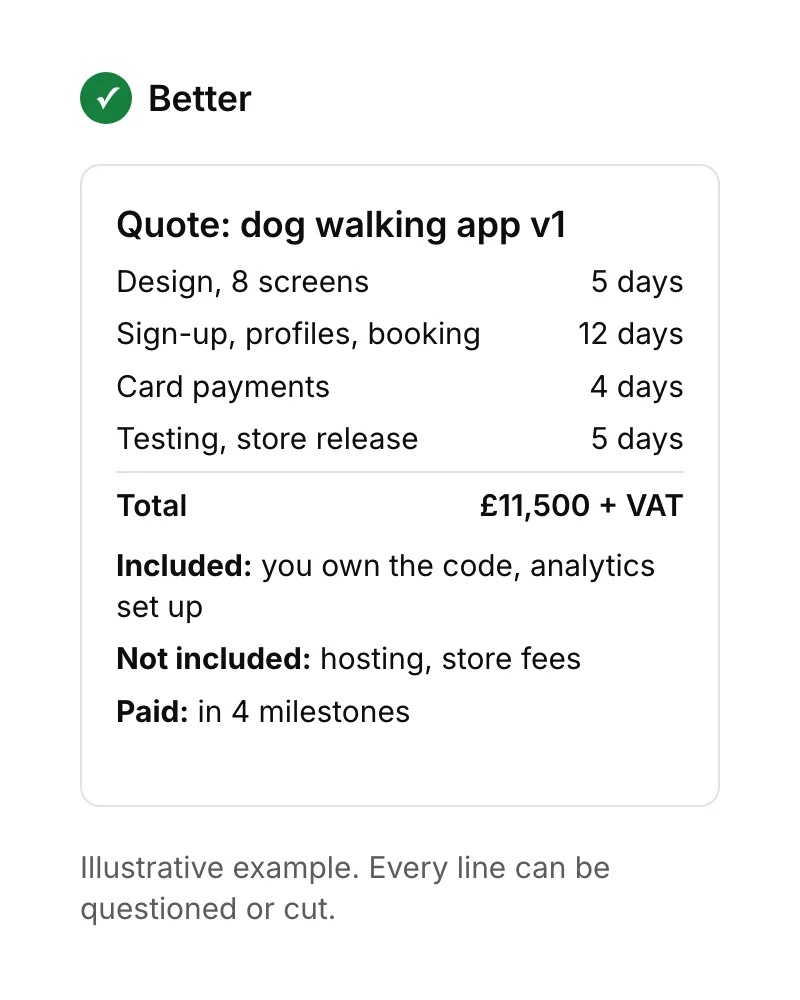
You get an accurate app development quote by sending a short, specific brief and asking for an itemised quote in return. The brief says who the app is for, the one main job it does, the must-have features and your budget. The quote shows time per feature, what's included and what isn't.
Here's the same app idea, described two ways:
The quote you get back matters just as much. A single total tells you nothing about what's missing:
What to ask before you accept a quote
Before you accept any quote, ask these questions:
- Will I own the code, and will the App Store and Google Play accounts be in my name? (Our guide to legally owning your app explains why this matters.)
- What isn't included, such as hosting, store fees or content?
- How are changes priced once work has started?
- What happens after launch, and what does support cost each month?
At Ingenious App Studios, you get a free, itemised quote within 48 hours of your first call.
How can you spend less on your first app?
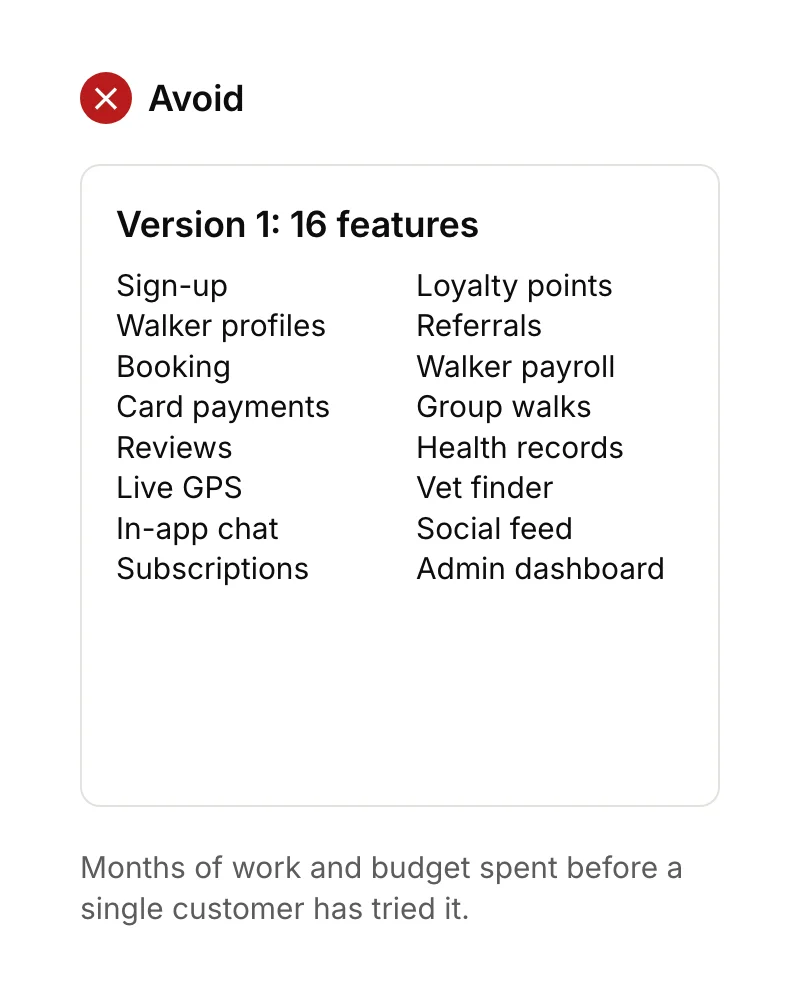
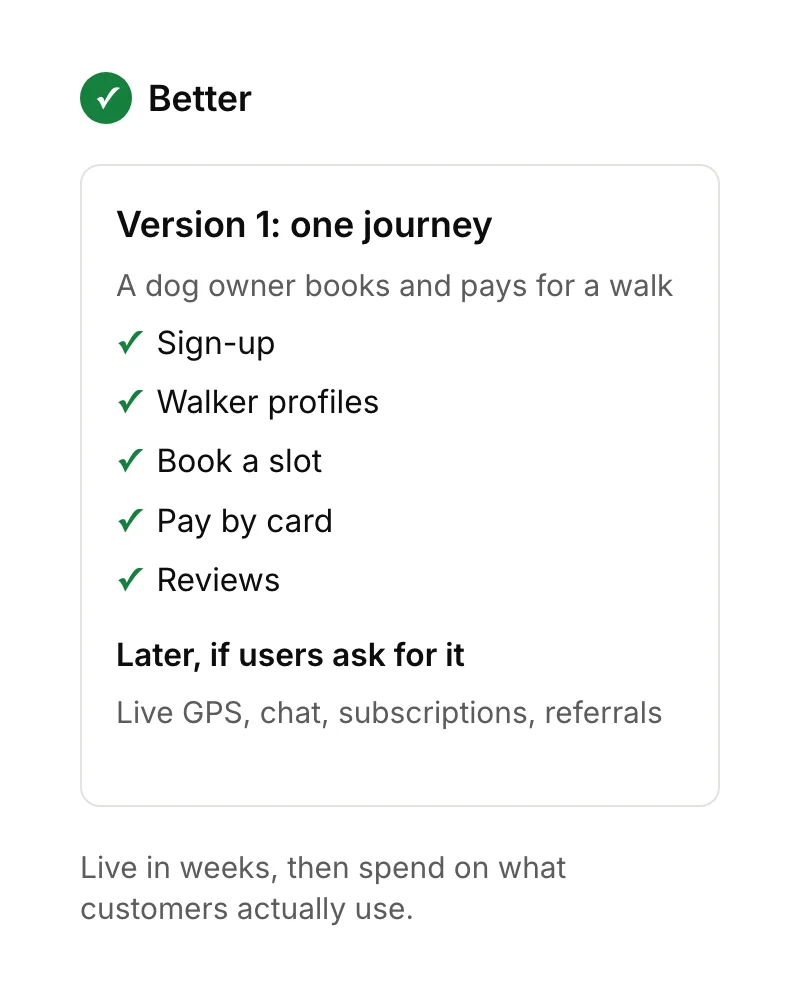
The most reliable way to spend less on an app is to build less. Launch a version that does one job well, watch how people use it, then pay for the next feature only when users show they need it. That's the point of an MVP (minimum viable product), the smallest version of your app that real users can try.
Other ways to keep the cost down
These also help, whoever builds your app:
- Check demand before you build. A landing page and 20 conversations cost far less than an app. See how to validate a startup idea.
- Use ready-made services for login, payments, maps and email, instead of building your own.
- Build once for both platforms with a cross-platform framework like Flutter.
- Add analytics from day one, so version 2 is based on what people actually do. We set up Mixpanel on every app by default.
- Keep a "later" list, and move a feature onto the plan only when there's evidence for it.
If your budget is close to zero, read can I make an app with no money first.
How long does it take to make an app?
A very small app can take 4 to 6 weeks to build, and apps with more features take longer. At Ingenious App Studios, the first milestone you can see and test usually arrives in under 4 weeks. Time and cost move together, because most of an app's price is days of work.
So a shorter timeline rarely means a cheaper app unless the scope shrinks too. If someone promises a big app quickly and cheaply, ask which features they've left out.
How much does it cost to make an app yourself or with AI?
How much does it cost to make an app yourself? Mostly your time. No-code and AI app builders let you make a simple working app for the price of a monthly subscription. They're good for prototypes, internal tools and testing an idea. But the limits show up with custom features, performance, and moving your app off the platform later.
We use AI in a different way. It helps us prototype, write code, create tests and review code, and a person checks every change before it ships. That's part of how we keep a first version close to £10,000 without cutting corners on quality.
Sources
- IT Jobs Watch, Flutter contract rates, UK, Android Developer contract rates, UK and iOS Developer contract rates, UK, six months to 14 September 2026. Checked 15 September 2026.
- Apple Developer, Enrolment. Checked 15 September 2026.
- Apple Developer, App Store Small Business Program. Checked 15 September 2026.
- Apple Newsroom, Apple announces App Store Small Business Program, 18 November 2020.
- Apple Developer, Upcoming requirements. Checked 15 September 2026.
- Apple Developer, App Review Guidelines, section 3.1.3(e). Checked 15 September 2026.
- Google Play Console Help, Create and set up your developer account. Checked 15 September 2026.
- Google Play Console Help, Service fees. Checked 15 September 2026.
- Google Play Console Help, Target API level requirements. Checked 15 September 2026.
- Flutter, flutter.dev. Checked 15 September 2026.
- Stripe, Pricing (UK). Checked 15 September 2026.
- Firebase, Pricing. Checked 15 September 2026.
- Mixpanel, Pricing. Checked 15 September 2026.
- GOV.UK, VAT rates. Checked 15 September 2026.